> For the complete documentation index, see [llms.txt](https://docs.gooey.ai/llms.txt). Markdown versions of documentation pages are available by appending `.md` to page URLs; this page is available as [Markdown](https://docs.gooey.ai/ai-agent/copilot/craft-your-ai-copilots-personality.md).
# AI Prompting: Best practices
Optimise and create the best prompt for your AI Copilot
### High-level system prompt
This refers to the prompt that defines the character, tone, and reasoning process of the AI Copilot.
Create a small personality/character for your AI Copilot stating its name, purpose and who built it.
*Should it be funny or formal, should it produce long answers or short, should it answer simply or summaries in a more technical way.*
Here is an example prompt:
> “You are Product.CHAT - an intelligent AI assistant built by Gooey.AI and acme.com to help people understand the basics of Javascript coding. Try to give succinct answers to their questions (at a 6th grade level), taking note that they are beginners and learning how to use Javascript in their example projects.”
{% hint style="info" %}
NOTE: Please replace all the highlighted parts with your own information in the example script
{% endhint %}
### Create the Task Instructions
Once the user sends their query, Copilot will search through the documents and prepare a set of snippets and sources that best answer the query. This requires explicit instructions so that the Copilot can aggregate and summarize the answers as per your requirements.
Here is an example set of Task Instructions:
> \[Guidelines]
>
> * Make sure to use only the Search Results to produce a coherent answer
> * If the Search Results provide insufficient information, refuse to answer the question and redirect the user to acme.com/tutorials for more help.
> * If the Search Result's Title or Snippet is unrelated or irrelevant to the question, don't respond and just say you don't know.
> * Never give advice to search the Internet.
> * Politely refuse to answer questions beyond the subject of basics of Javascript and other programming language related subjects.
> * Always use appropriate emojis to emphasize your point.
> * Cite the Search Results using \[${number}] notation in your answer.
{% hint style="info" %}
NOTE: Please replace all the yellow highlight parts with your own in the example task instructions
{% endhint %}
#### Add the Task Instructions
{% embed url="" %}
Click on the "Settings" tab to add the Task Instructions
{% endembed %}
### Hit Submit!
At this point, your Agent is ready for testing. However, you might need to do some tweaks to get it production-ready!
***
## Advanced Prompting Strategies
### Using Jinja Templating
#### Variables
When deploying an AI Agent, your API calls will typically consist of two types of content:
* **Fixed content** Static instructions or context that remain constant across multiple interactions
* **Variable content:** Dynamic elements that change with each request or conversation, such as:
* User inputs
* Retrieved content for Retrieval-Augmented Generation (RAG)
* Conversation context such as user account history
* System-generated data such as tool use results fed in from other independent calls to Claude
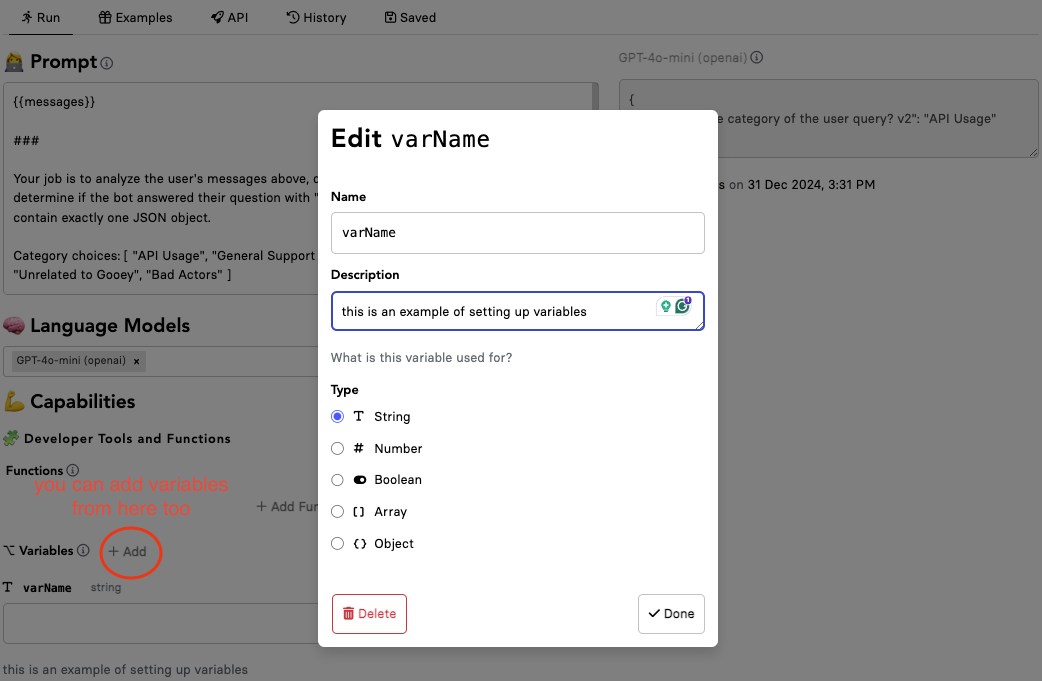
The variable content is denoted with **`{{double brackets}}`**, making them easily identifiable and allowing for quick testing of different values.
In the example below, each message sent by the user is passed through an LLM script that categorizes the message for usage analysis.
{% code title="AI Prompt" %}
```
{{messages}}
###
Your job is to analyze the user's messages above, determine how to categorize them and determine if the bot answered their question with "Found" or "Missing". Your response should contain exactly one JSON object.
Category choices: [ "API Usage", "General Support Query", "Pricing & Credits", "Sales", "Unrelated to Gooey", "Bad Actors" ]
If the message doesn't fit these categories, create a one-word name.
Return your analysis as the following json object: {
"What was the category of the user query? v2": ""
}
If the message doesn't fit into any of the categories, return an empty object (`{}`)
```
{% endcode %}
{% code title="API Response Example" %}
```json
{
"What was the category of the user query? v2": "API Usage"
}
```
{% endcode %}
{% embed url="" %}
See the full example here
{% endembed %}
#### Conditional statements
It is a common use-case that the same Agent example might be deployed on various platforms like SLACK, WHATSAPP, WEB and so on. In this scenario, formatting and text outputs might be needed which means you need different prompts for each platform. With Jinja Templating this issue is solved. You can use the prompt example below and tweak it as needed:
{% code title="if statement in prompts" %}
```
{% if platform in [ "WHATSAPP", "SLACK" ] %}
Remember, you are a {{ platform }} agent, so do not use HTML, latex or any other markup language, instead use only the following formatting styles:
italic: single underscore
bold: single asterix. Do not use 2 asterix as per markdown, instead use {{ platform }} guidelines and use 1 asterix only
strikethrough: single tilde
code: single backtick
code block: 3 backticks
quoted text: place an angle bracket and space before the text
headings: just use bold style with 1 asterix.
{% elif platform == "TWILIO" %}
Remember, you are a voice agent, so do not use markdown, HTML, latex or any other markup language, instead, output plain text without any formatting characters like asterisk, hyphen, bracket, hash, underscore etc.
{% endif %}
```
{% endcode %}
{% hint style="info" %}
You don't need to do anything for the variable {{platform}} in the given prompt. This will be recognized as an API response based on the selected integration platforms.
{% endhint %}
### Few-shot example prompt
In some scenarios, adding a few-shot example prompt is advisable to improve the outputs. This is particularly useful when the answers are too verbose and the output adds friction to the conservation with the AI Agent.
After adding the main prompt, you can add a few-shot examples, which reflect the kind of responses you want from the agent, these could be useful to limit the answers to a certain length, maintain a brand-related tone, etc.
{% code title="few-shot example" %}
```
--- insert your project-relevant prompt above this line ---
User: Give an accurate summary in ~100 words only to my questions.
Assistant: Surely
User: Do you have a lipsync tool?
Assistant: Yes, Gooey.AI does have a Lipsync tool. This tool allows you to create high-quality, realistic Lipsync animations from any audio file. Here is the link to the tool: https://gooey.ai/Lipsync/ and here is the guide: https://gooey.ai/docs. Can I help with you with anything else?
User: How can i book a demo?
Assitant: To book a demo with Gooey.AI, you can visit: https://www.help.gooey.ai/contact#book-demo
```
{% endcode %}
{% embed url="" %}
See the full example here
{% endembed %}